How’s that done?
library(jsonlite)
BondFunds <- read.csv("./data/BondFunds.csv")
library(reticulate)Today, we continue data visualization.
Our reading for today includes a section of Open Intro Stats and Hadley Wickham’s Grammar of Graphics.
library(jsonlite)
BondFunds <- read.csv("./data/BondFunds.csv")
library(reticulate)I will use Gemini. Claude can also do this.
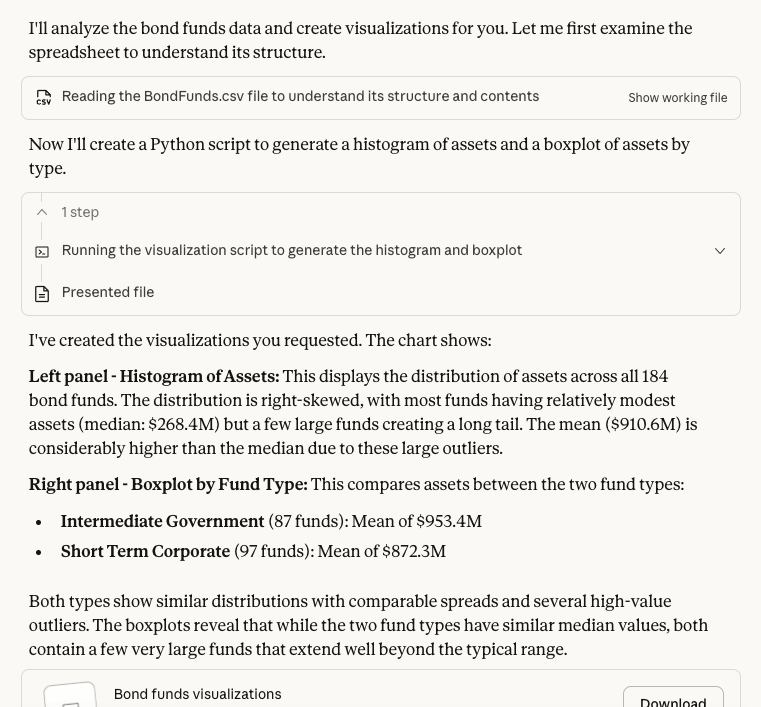
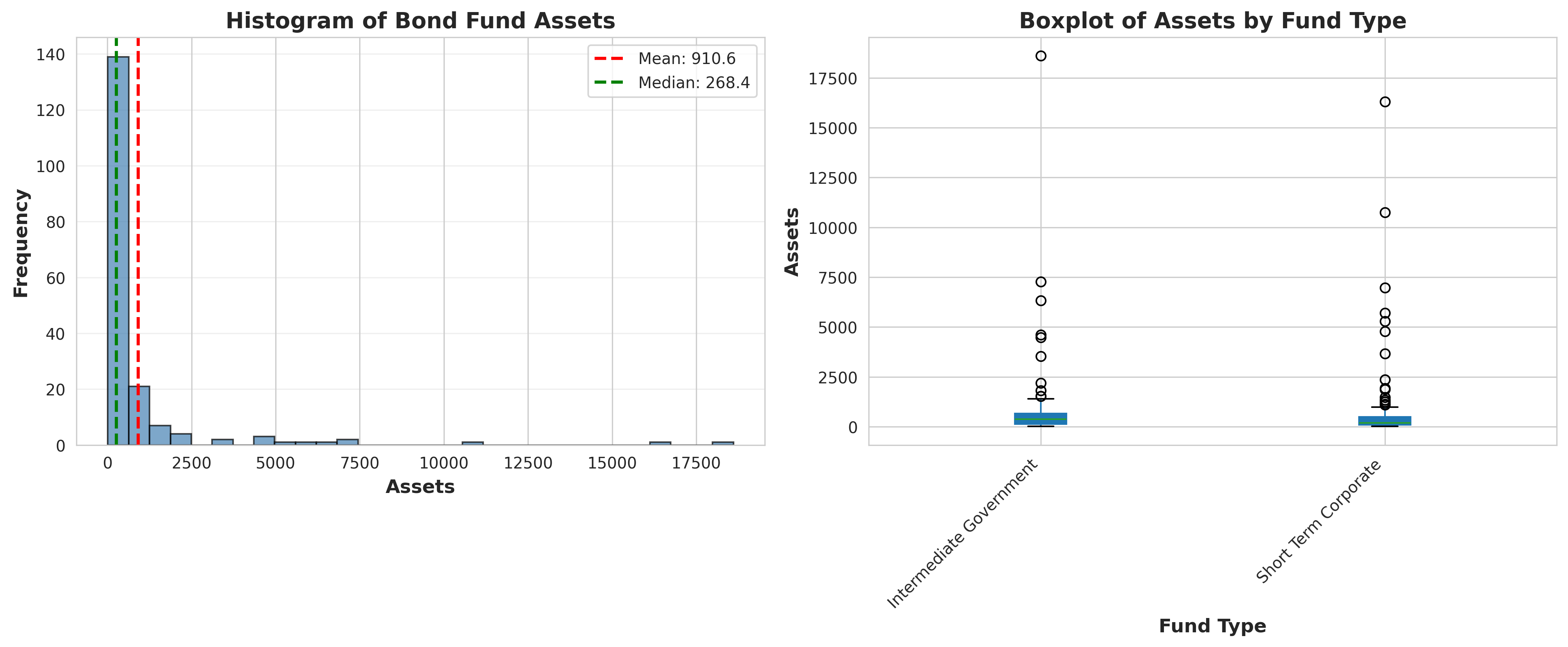
Prompt: Can you provide a histogram of assets and a boxplot of assets by type for the following spreadsheet?
ChatGPT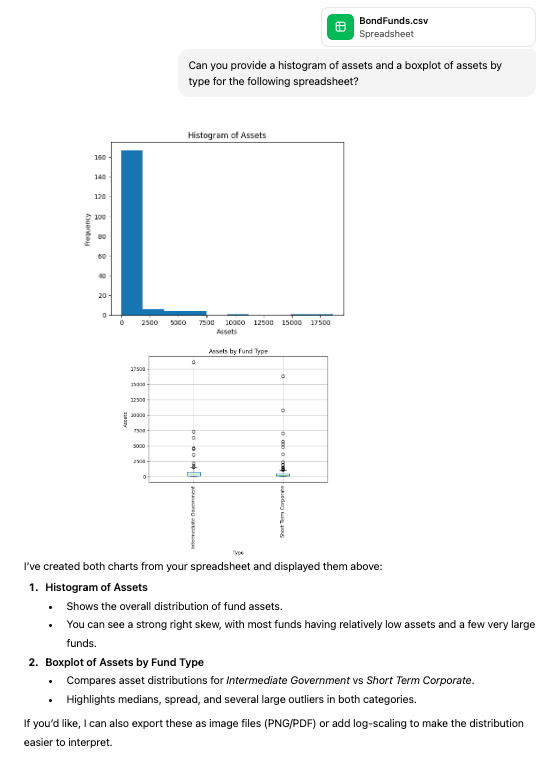
plotnineimport pandas as pd
from plotnine import (
ggplot, aes, geom_histogram, geom_boxplot,
labs, theme, element_text, coord_flip
)
df = pd.read_csv('./data/BondFunds.csv')
# Histogram of Assets
hist_plot = (
ggplot(df, aes(x='Assets'))
+ geom_histogram(bins=30)
+ labs(title='Histogram of Assets', x='Assets', y='Frequency')
)
hist_plot.show()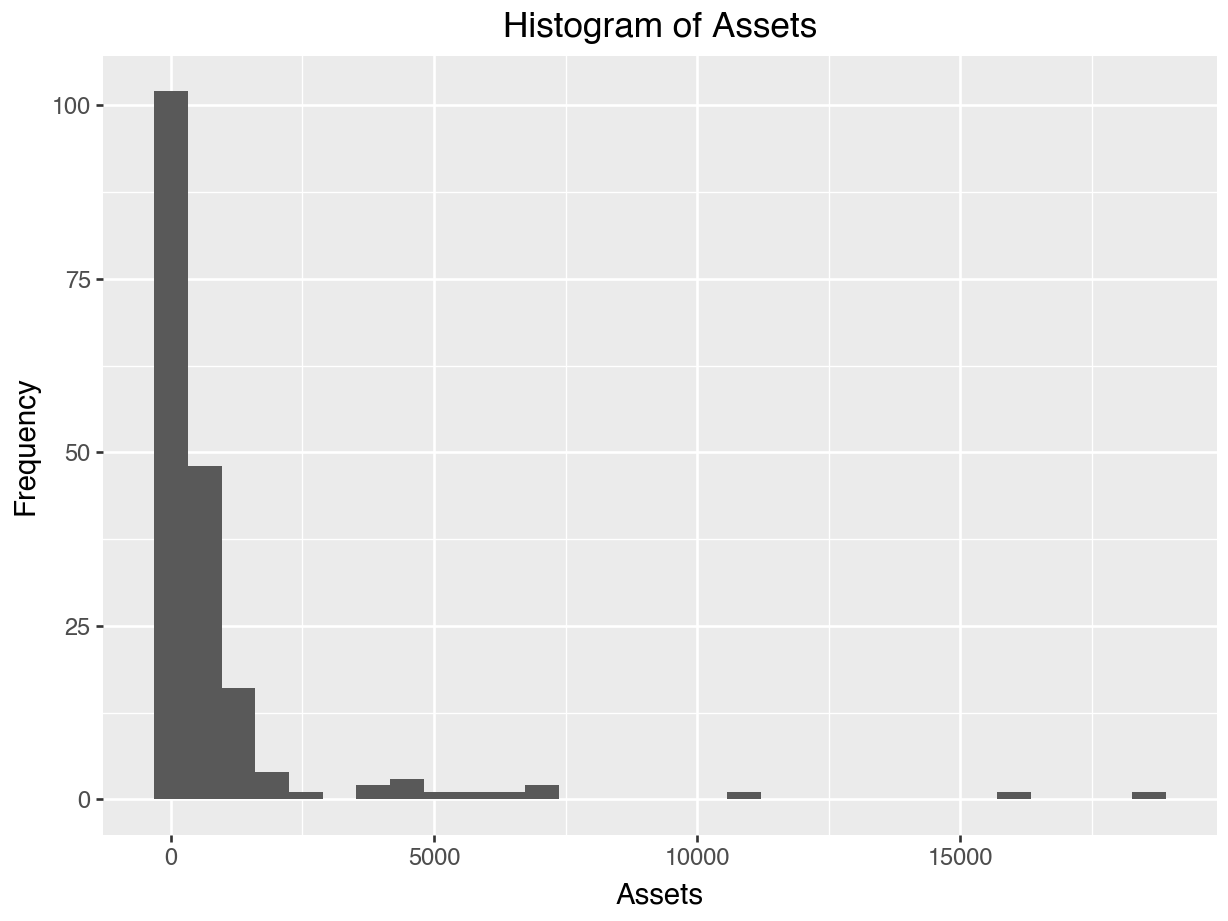
# Boxplot of Assets by Type
box_plot = (
    ggplot(df, aes(x='Type', y='Assets'))
    + geom_boxplot()
    + labs(title='Assets by Fund Type', x='Type', y='Assets')
    + theme(axis_text_x=element_text(rotation=90, hjust=1))
    + coord_flip()
)
box_plot.show()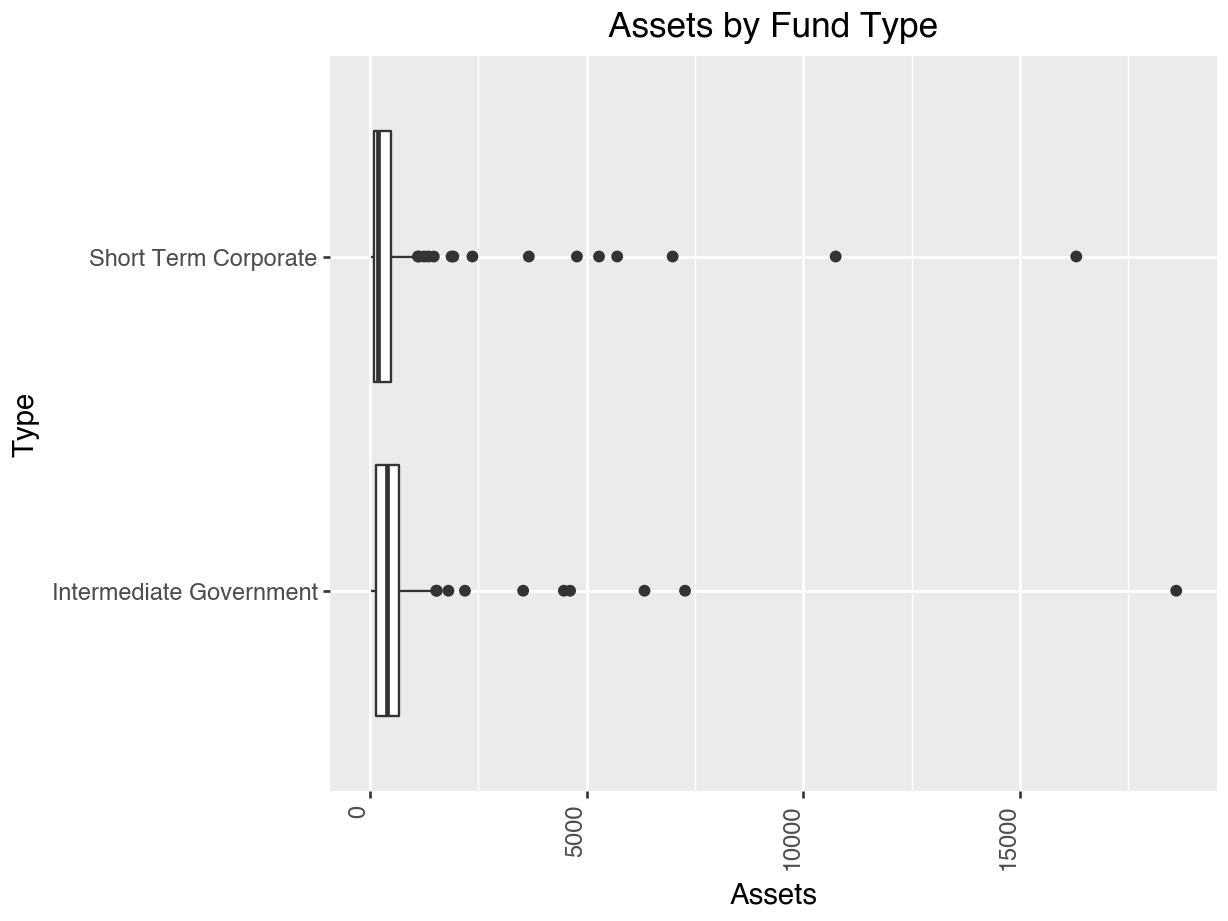
The data set presented is designed to represent a sample of 1,000 DDS consumers (which provides a 95% confidence interval with a margin of error of plus-or-minus 3.5% for this 250,000 consumer population). The data set includes six variables (i.e., fields) which are: ID, age cohort/age (binned/unbinned), gender, expenditures, and ethnicity. NB: The data set originated from DDS’s Client Master File. In order to remain in compliance with California State Legislation, the data have been altered to protect the rights and privacy of specific individual consumers. The provided data set is based on actual attributes of consumers.
ID is the unique identification code for each consumer. It is similar to a social security number and used for identification purposes.
Age cohort/age is a key variable in the case exercise. While age is a legal basis for discrimination in many situations, age is not an attribute that would be considered in a discrimination claim for this particular population. The purpose of providing funds to those with developmental disabilities is to help them live like those without disabilities. As consumers get older, their financial needs increase as they move out of their parent’s home, etc. Therefore, it is expected that expenditures for older consumers will be higher than for the younger consumers.
We have included both binned (Age cohort) and unbinned (Age) variables to represent a consumer’s age. The binned age variable is represented in the data set as six age cohorts. Each consumer is assigned to an age cohort based on their years since birth. The six cohorts include: 0-5 years old, 6-12, 13-17, 18-21, 22-50, and 51+. The cohorts are established based on the amount of financial support typically required during a particular life phase.
The 0-5 cohort (preschool age) has the fewest needs and requires the least amount of funding. For the 6-12 cohort (elementary school age) and 13-17 (high school age), a number of needed services are provided by schools. The 18-21 cohort is typically in a transition phase as the consumers begin moving out from their parents’ homes into community centers or living on their own. The majority of those in the 22-50 cohort no longer live with their parents but may still receive some support from their family. Those in the 51+ cohort have the most needs and require the most amount of funding because they are living on their own or in community centers and often have no living parents.
Gender is included in the data set as another variable to consider because it is an attribute on which many discrimination cases are based.
Expenditures variable represents the annual expenditures the State spends on each consumer in supporting these individuals and their families. It is important that students realize this is the amount each consumer receives from the State. Expenditures include services such as: respite for their families, psychological services, medical expenses, transportation, and costs related to housing such as rent (especially for adult consumers living outside their parent’s home).
Ethnicity is the key demographic variable in the data set as it pertains to the case. Eight ethnic groups are represented in the data set. These groups reflect the demographic profile of the State of California. Our key area of interest will become Hispanic and White, non-Hispanic comparisons.
Is there evidence of sex bias in admission practices? Data on admissions to the University of California at Berkeley graduate programs in six departments are presented for the population of applicants. Admit measures whether or not the applicant was admitted; M.F measures the [self-reported, two options] gender of the applicant; Dept measures the department in a classification ranging from A to F.
import pandas as pd

df = pd.read_csv('./data/UCB-Admit.csv')
print(df.head())
M.F Admit Dept
0 Male Yes A
1 Male Yes A
2 Male Yes A
3 Male Yes A
4 Male Yes Aprint(df.info())<class 'pandas.DataFrame'>
RangeIndex: 4526 entries, 0 to 4525
Data columns (total 3 columns):
# Column Non-Null Count Dtype
--- ------ -------------- -----
0 M.F 4526 non-null str
1 Admit 4526 non-null str
2 Dept 4526 non-null str
dtypes: str(3)
memory usage: 106.2 KB
Noneimport matplotlib.pyplot as plt
import seaborn as sns
# Aggregate data
# We want to count occurrences of each (M.F, Admit) pair
counts = df.groupby(['M.F', 'Admit']).size().unstack(fill_value=0)
# Inspect the aggregated data
print(counts)Admit No Yes
M.F
Female 1278 557
Male 1493 1198# Plotting
# X-axis: M.F (Index of counts)
# Stacks: Admit (Columns of counts)
# Using pandas plot kind='bar', stacked=True is easiest
ax = counts.plot(kind='bar', stacked=True, figsize=(10, 6), color=['#d65f5f', '#5fba7d'])
plt.title('Admission Status by Gender')
plt.xlabel('Gender')
plt.ylabel('Count')
plt.xticks(rotation=0)(array([0, 1]), [Text(0, 0, 'Female'), Text(1, 0, 'Male')])plt.legend(title='Admit')
plt.tight_layout()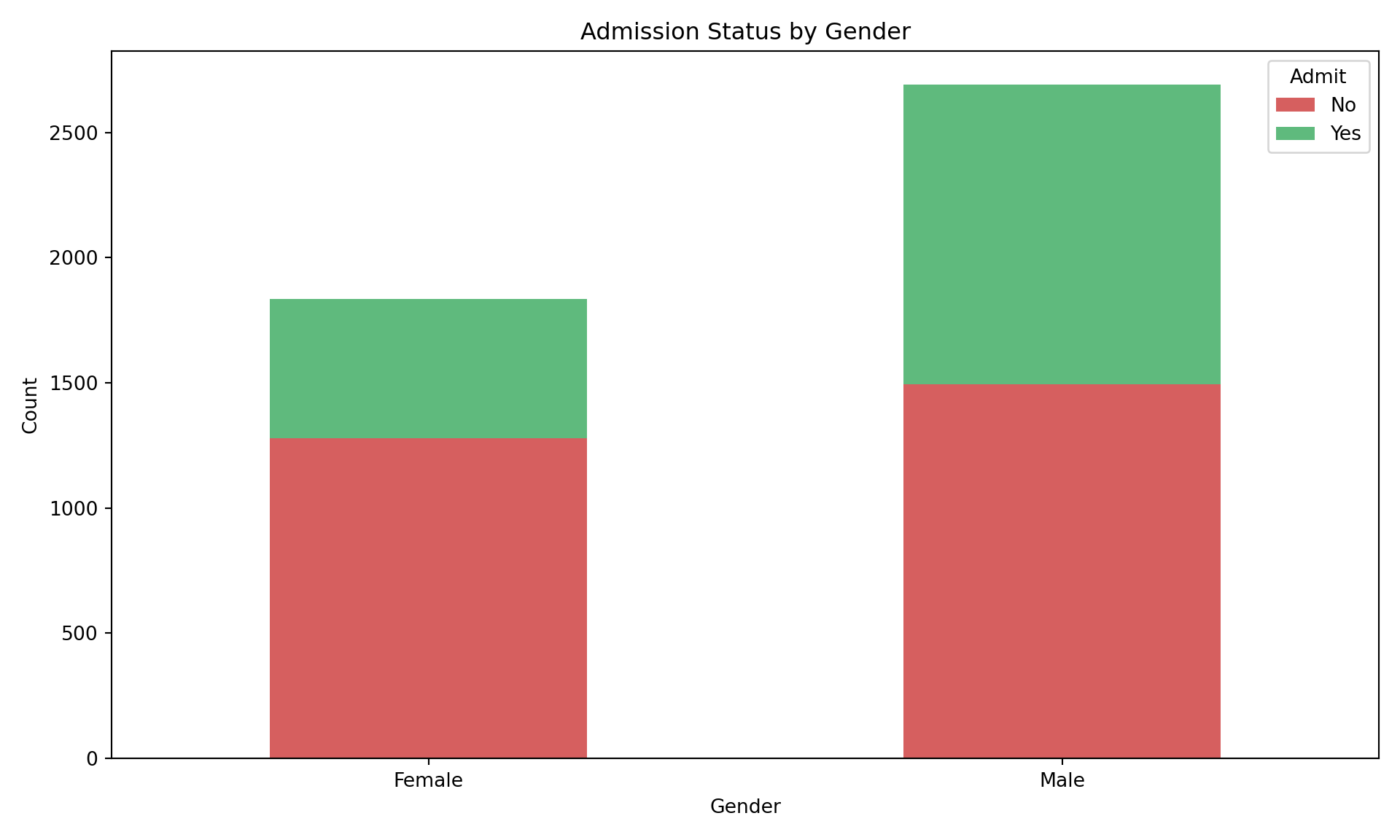
This data has missing values.
import pandas as pd

# 1. Import the CSV file
url = "./data/FastFood.csv"
df = pd.read_csv(url)

# 2. Count of Missing Values (for all columns)
print("--- Count of Missing Values ---")
--- Count of Missing Values ---print(df.isnull().sum())restaurant 0
item 0
calories 0
cal_fat 0
total_fat 0
sat_fat 0
trans_fat 0
cholesterol 0
sodium 0
total_carb 0
fiber 12
sugar 0
protein 1
vit_a 214
vit_c 210
calcium 210
salad 0
dtype: int64print("\n")# Filter for numeric columns only for the statistical calculations
numeric_df = df.select_dtypes(include='number')
# 3. Mean
print("--- Mean ---")--- Mean ---print(numeric_df.mean())calories 530.912621
cal_fat 238.813592
total_fat 26.590291
sat_fat 8.153398
trans_fat 0.465049
cholesterol 72.456311
sodium 1246.737864
total_carb 45.664078
fiber 4.137177
sugar 7.262136
protein 27.891051
vit_a 18.857143
vit_c 20.170492
calcium 24.852459
dtype: float64print("\n")# 4. Standard Deviation
print("--- Standard Deviation ---")--- Standard Deviation ---print(numeric_df.std())calories 282.436147
cal_fat 166.407510
total_fat 18.411876
sat_fat 6.418811
trans_fat 0.839644
cholesterol 63.160406
sodium 689.954278
total_carb 24.883342
fiber 3.037460
sugar 6.761301
protein 17.683921
vit_a 31.384330
vit_c 30.592243
calcium 25.522073
dtype: float64print("\n")# 5. Five Number Summary (Min, Q1, Median, Q3, Max)
# The describe() function includes count, mean, std, and the 5-number summary.
# We will select specific rows to isolate the 5-number summary.
print("--- Five Number Summary ---")--- Five Number Summary ---print(numeric_df.describe().loc[['min', '25%', '50%', '75%', 'max']]) calories cal_fat total_fat sat_fat ... protein vit_a vit_c calcium
min 20.0 0.0 0.0 0.0 ... 1.0 0.0 0.0 0.0
25% 330.0 120.0 14.0 4.0 ... 16.0 4.0 4.0 8.0
50% 490.0 210.0 23.0 7.0 ... 24.5 10.0 10.0 20.0
75% 690.0 310.0 35.0 11.0 ... 36.0 20.0 30.0 30.0
max 2430.0 1270.0 141.0 47.0 ... 186.0 180.0 400.0 290.0
[5 rows x 14 columns]Your assignment for this time: